Empowering students with valuable skills and career opportunities
Ask the Question
What problem are we trying to solve?
Offset staffing needs?
Deliver real-world skills?
Boost student device responsibility?
Innovate classroom experience?
In-house repair program setup ideas for your school.
Why In-house Repair?
Cost Savings
In-house repair programs eliminate the need to pay external service providers, saving schools money on service contracts and administrative fees
Save on cost by performing repairs before major failure occurs
Repairing devices instead of replacing them reduces electronic waste and supports environmentally friendly practices
By keeping devices functional and reliable, schools get more value from their technology budgets and minimize unnecessary replacements
Student Skills
In-house repair programs provide hands-on learning, technical skills, critical thinking, teamwork, and career pathways in technology.
Technical Skills: Students learn to identify, diagnose, and fix device issues, gaining hands-on experience with hardware, software, and troubleshooting methods. They also develop safe repair practices and an understanding of device components and architecture.
Professional and Career Skills: Programs emphasize customer service, professional communication, and parts/inventory management, all of which are valuable in tech support and IT careers
Leadership and Responsibility: Students often take on leadership roles within repair teams, building project management, teamwork, and accountability skills
Quality Control and Problem-Solving: Repair programs teach students to ensure repairs meet quality standards and to approach technical challenges methodically
Career Readiness
In-house repair programs create “tomorrow-ready” students by offering real work experience, certifications, and leadership opportunities.
They offer real-world experience, partnered with WISE certification, these programs are preparing students for industry credentials and future employment in technology fields.
This hands-on, structured learning environment transforms technical curiosity into career-ready expertise.
Device Longevity
In-house repair programs keep devices functional longer by fixing issues early, preventing minor problems from causing major failures.
Performing proper maintenance is easier with in-house repair programs; combined with timely repairs, they can extend device lifecycles by years.
Proactive maintenance strategies, including regular checkups and software updates, help avoid costly breakdowns and prolong device usability.
Quick Repair Turn-Around
In-house repairs by trained students and staff significantly reduce device downtime.
From simple to complex, repairs down in-house mean devices in the hands of students.
Devices remain available for learning without long wait times due to shipping or unforeseen delays.
Reduces E-Waste
Repairing rather than disgarding whole units, in-house repair programs allow schools to replace and recycle parts of damaged devices
Replacing and reusing parts helps support eco-friendly practices by reducing electronic waste
Using out-dated or unusable devices for parts to repair other devices reduces e-waste and saves the school money on parts
Responsibility and Digital Citizenship
an in-house repair program promotes responsibility and digital citizenship by teaching students to care for technology responsibly and use devices ethically
it fosters ownership, accountability, and safe, respectful technology use-helping students become proactive and responsible digital citizens
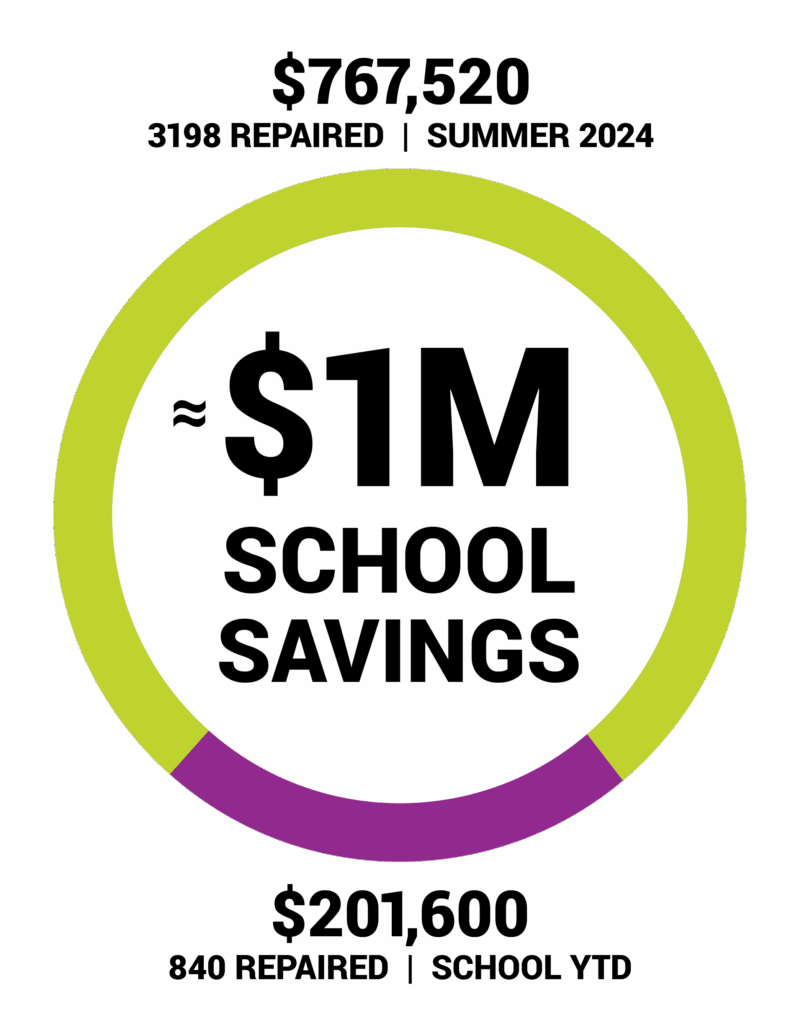
Real In-house Repair Results*
*Stats provided by Oakland Unified School District
Start Here. Start Now.
In-house Repair Program Setup Ideas
Staff-Led Repairs.
IT staff or teachers handle all repairs.
Student-Led Repairs.
Students perform repairs and rotate through roles (repair, customer service, management). Teacher or IT staff supervises.
Collaborative Student-Led.
Teacher facilitates learning and manages the class. IT technician oversees repair quality and safety, while students are responsible for the repairs.
PROS
Professional oversight, consistent quality
CONS
Higher staff workload
Need for more staff
PROS
Combines education with expert supervision
CONS Requires teamwork between staff roles
PROS
Students gain hands-on experience
Reduces IT workload
Develops leadership and teamwork
CONS Initial training period Ongoing supervision
Staff-Led Repairs.
IT staff or teachers handle all repairs.
PROS
Professional oversight, consistent quality.
CONS
Higher staff workload.
Need for more staff.
Student-Led Repairs.
Students perform repairs and rotate through roles (repair, customer service, management). Teacher or IT staff supervises.
PROS
Students gain hands-on experience.
Reduces IT workload.
Develops leadership and teamwork.
CONS
Initial training period
Ongoing supervision.
Collaborative Student-Led.
Teacher facilitates learning and manages the class. IT technician oversees repair quality and safety, while students are responsible for the repairs.